DDBug 2.0
DDBug is a simple and user-friendly issue tracking system inspired by several other such systems and influenced by the ideas of Extreme Programming.
Actors
DDBug was designed with two audiences (actors) in mind:
- Customer
- requests corrections or new features
- Developer
- fixes bugs and implements features
Workflow
"New" issues are usually created by the Customer. When a Developer takes over the issue it enters the "Analysis" state. For normal issues, the next states set by the Developer are "Fixing" and "Fixed". A "Fixed" issue requires an approval from the Customer. When that happens, the issue is "Approved". This is the shortest path for a normal issue. See the diagram below for other possible paths.
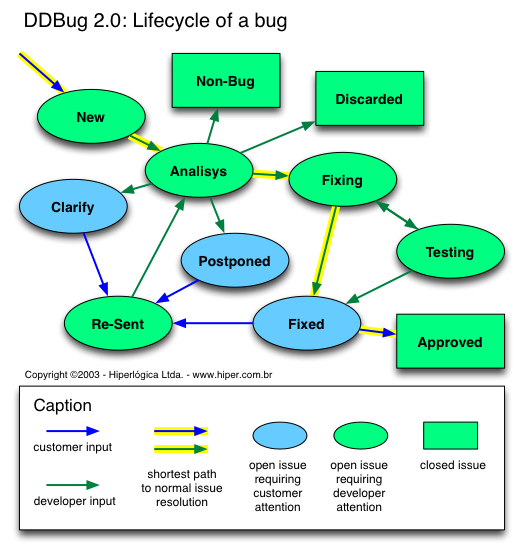
States
Here is a description of all states that an issue can go through.
- New
- Issue was just reported by a Customer.
- Analisys
- Developer is studying the issue.
- Clarify
- Developer requests clarification from Customer (usually because the issue is unclear or cannot be reproduced).
- Fixing
- Developer is working on the issue.
- Testing
- Developer is testing the solution of the issue.
- Fixed
- Developer believes the issue is solved; requests approval from Customer.
- Aproved
- Client approves fix. Issue is CLOSED.
- Re-Sent
- Customer re-submits issue for analysis (after Clarify, Fixed or Postponed).
- Non-Bug
- Developer determines that issue is not a bug (usually because the request was caused by misunderstanding of functionality intended as a feature). Issue is CLOSED.
- Discarded
- Developer recognizes the issue but decides not to fix it (perhaps the cost of fixing exceeds the benefit, or the broken feature is being phased out). Issue is CLOSED.
- Postponed
- Developer has decided to postpone solution of the issue (maybe the fix depends on the solution of other pending issues).
Open X Closed Issues
"Approved", "Non-Bug" and "Discarded" are terminal states which indicate the issue is CLOSED. Issues in all other states are considered OPEN. Reopening issues is not currently supported.
Priority X Severity
The Customer uses Priority to determine the order in which issues are to be tackled by the Developer. Priorities range from 1 (highest) to 5 (lowest).
Only the Customer can set the Priority attribute of an issue. If the Customer sets every issue to Priority 1, the Developer is free to work on them in any order she/he prefers (usually in order of Severity).
The Customer can also set the Severity of a bug, but only as a suggestion. The Developer has full authority over Severity (once a Developer touches the Severity attribute, the Customer cannot change it anymore).
Open issues should be solved by order of Priority. Issues tied for Priotity should be solved by Severity.
Priority and Severity are independent. A COSMETIC issue can have a Priority of 1 (perhaps a trademark was misspelled), and an UNAVOIDABLE issue can have a Priority of 5 (maybe the broken feature is unimportant or rarely used). CRITICAL issues are always highest priority, by definition.
Severity Levels
- Critical
- Panic. The system is unusable. All work with the system has stopped and testing cannot continue until the bug is fixed.
- Unavoidable
- A certain part of the system cannot be used. There are no known workarounds.
- Avoidable
- Use of a certain part of the system is impaired. There are workarounds, but they are not practical.
- Cosmetic
- Something is wrong with the look and feel of the system, but no functionality is impaired.
- Improvement
- Request for improvement or new feature.
Copyright (c) 2003, Hiperlogica Ltda. (http://www.hiper.com.br)